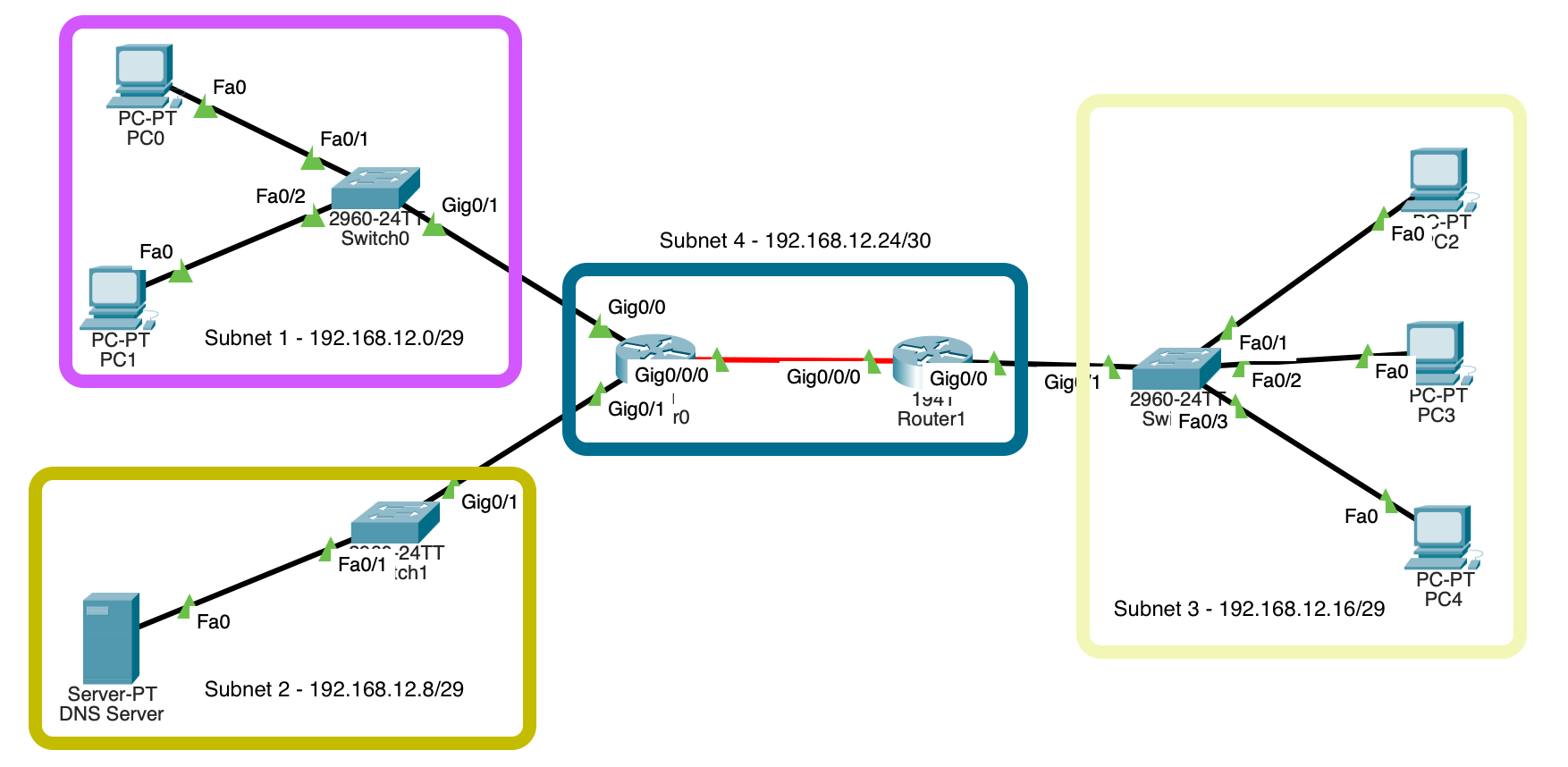
Overview
While studying the content of the CCNA, I wanted to create a small lab in Packet Tracer, this is to understand the CLI of Cisco products more & build upon my knowledge so far.
Subnetting
I decided to subnet the IP range 192.168.12.0/24 into smaller smaller subnets to use: This would be split into 4 subnets, 3 of which would be /29 & one a /30 for the inter-link between routers.
| Network IP | First Usable IP | Last Usable IP | Broadcast IP | Subnet Mask | Final |
|---|---|---|---|---|---|
| Subnet 1 | |||||
| 192.168.12.0 | 192.168.12.1 | 192.168.12.6 | 192.168.12.7 | 255.255.255.248 | 192.168.12.0/29 |
| Subnet 2 | |||||
| 192.168.12.8 | 192.168.12.9 | 192.168.12.14 | 192.168.12.15 | 255.255.255.248 | 192.168.12.8/29 |
| Subnet 3 | |||||
| 192.168.12.16 | 192.168.12.17 | 192.168.12.22 | 192.168.12.23 | 255.255.255.248 | 192.168.12.16/29 |
| Subnet 4 | |||||
| 192.168.12.24 | 192.168.12.25 | 192.168.12.26 | 192.168.12.27 | 255.255.255.252 | 192.168.12.24/30 |
Moving Forward...
PC's/Servers
For each subnet, I gave the PC's/Servers an IP in the designated subnet range for each region.
| PC Name | Subnet Label | IP Address |
|---|---|---|
| PC0 | Subnet 1 | 192.168.12.5/29 |
| PC1 | Subnet 1 | 192.168.12.6/29 |
| DNS Server | Subnet 2 | 192.168.12.14/29 |
| PC2 | Subnet 3 | 192.168.12.22/29 |
| PC3 | Subnet 3 | 192.168.12.21/29 |
| PC4 | Subnet 3 | 192.168.12.20/29 |
Switch
For the switches, I used specific commands to turn off unused ports, name the ports that are in use, give passwords to enter the switch & go to higher privilege levels, adding default gateway, obscuring passwords in running config.
                                switch>en

                                switch#
                                switch#conf t

                                switch(config)#
                                switch(config)#hostname switch1

                                switch(config)#banner motd %Authorised staff only!%

                                switch(config)#service password-encryption

                                switch(config)#no ip domain lookup
                                switch1(config)#ip default-gateway 192.168.12.1

                                switch1(config)#ip default-gateway 192.168.12.14
                                switch1(config)#lin con 0

                                switch1(config-line)#
switch1(config-line)#logging sync
                                switch1(config-line)#password Quack

                                switch1(config-line)#login

                                switch1(config-line)#enable secret Quack

                                switch1(config-line)#end
                                switch1#conf t

                                switch1(config)#int range f0/3-24

                                switch1(config-if-range)#desc Unused

                                switch1(config-if-range)#shutdown
                                switch1(config)#int f0/1

                                switch1(config-if-range)#desc Connection to PC

                                switch1(config-if-range)#no shutdown

                                switch1(config-if-range)#ex

                                switch1(config)#int f0/2

                                switch1(config-if-range)#desc Connection to PC

                                switch1(config-if-range)#no shutdown
                                switch1(config)#int g0/1

                                switch1(config-if-range)#desc Connection to Router0

                                switch1(config-if-range)#no shutdown
Router
The routers have a similar setup to the switches when it comes to naming & setting security features.
                                router>en

                                router#conf t

                                router(config)#hostname router1

                                router(config)#banner motd %Authorised staff only!%

                                router(config)#service password-encryption

                                router(config)#no ip domain lookup

                                router(config)#lin con 0

                                router(config-line)#logging sync

                                router(config-line)#password Quack

                                router(config-line)#login

                                router(config-line)#enable secret Quack
                                router(config)#int g0/0

                                router(config-if)#desc Connection to switch0

                                router(config-if)#ip address 192.168.12.1 255.255.255.248

                                router(config-if)#no ip proxy-arp

                                router(config-if)#no shutdown

                                router(config-if)#ex

                                router(config)#int g0/0

                                router(config-if)#desc Connection to switch1

                                router(config-if)#ip address 192.168.12.9 255.255.255.248

                                router(config-if)#no ip proxy-arp

                                router(config-if)#no shutdown
                                router(config)#int g0/0/0

                                router(config-if)#desc Connection to router1

                                router(config-if)#ip address 192.168.12.25 255.255.255.252

                                router(config-if)#no ip proxy-arp

                                router(config-if)#no shutdown

                                router(config-if)#ex

                                router(config)#ip route 0.0.0.0 0.0.0.0 192.168.12.26
Repeat!!
Some of the config's were changed to match up with the correct IP & names but once these were all set, adding the default gateway to computers, along with DNS IP & default gateway they were able to ping each other across the router-inter link & DNS worked to resolve hostnames.
Running Configs
Here is the running configs for one of the switches & routers, along with a download for the packet tracer file if you so wish to have a look around & watch how traffic is sent around the network.
Building configuration...

Current configuration : 2086 bytes
!
version 15.0
no service timestamps log datetime msec
no service timestamps debug datetime msec
service password-encryption
!
hostname switch1
!
enable secret 5 $1$mERr$hQrUjOzjM9dJEobE7UIsm/
!
!
!
no ip domain-lookup
ip name-server 192.168.12.14
!
!
!
spanning-tree mode pvst
spanning-tree extend system-id
!
interface FastEthernet0/1
 description Connection to PC
!
interface FastEthernet0/2
 description Connection to PC
!
interface FastEthernet0/3
 description Unused
 shutdown
!
interface FastEthernet0/4
 description Unused
 shutdown
!
interface FastEthernet0/5
 description Unused
 shutdown
!
interface FastEthernet0/6
 description Unused
 shutdown
!
interface FastEthernet0/7
 description Unused
 shutdown
!
interface FastEthernet0/8
 description Unused
 shutdown
!
interface FastEthernet0/9
 description Unused
 shutdown
!
interface FastEthernet0/10
 description Unused
 shutdown
!
interface FastEthernet0/11
 description Unused
 shutdown
!
interface FastEthernet0/12
 description Unused
 shutdown
!
interface FastEthernet0/13
 description Unused
 shutdown
!
interface FastEthernet0/14
 description Unused
 shutdown
!
interface FastEthernet0/15
 description Unused
 shutdown
!
interface FastEthernet0/16
 description Unused
 shutdown
!
interface FastEthernet0/17
 description Unused
 shutdown
!
interface FastEthernet0/18
 description Unused
 shutdown
!
interface FastEthernet0/19
 description Unused
 shutdown
!
interface FastEthernet0/20
 description Unused
 shutdown
!
interface FastEthernet0/21
 description Unused
 shutdown
!
interface FastEthernet0/22
 description Unused
 shutdown
!
interface FastEthernet0/23
 description Unused
 shutdown
!
interface FastEthernet0/24
 description Unused
 shutdown
!
interface GigabitEthernet0/1
 description Link to router1 g0/0/2
!
interface GigabitEthernet0/2
 description Unused
 shutdown
!
interface Vlan1
 no ip address
 shutdown
!
ip default-gateway 192.168.12.1
!
banner motd ^CAuthorised staff only!^C
!
!
!
line con 0
 password 7 0810594F0A12
 logging synchronous
 login
!
line vty 0 4
 login
line vty 5 15
 login
!
!
!
!
end
Building configuration...

Current configuration : 1050 bytes
!
version 15.1
no service timestamps log datetime msec
no service timestamps debug datetime msec
service password-encryption
!
hostname router0
!
!
!
enable secret 5 $1$mERr$hQrUjOzjM9dJEobE7UIsm/
!
!
!
!
!
!
no ip cef
no ipv6 cef
!
!
!
!
license udi pid CISCO1941/K9 sn FTX1524W9GC-
!
!
!
!
!
!
!
!
!
no ip domain-lookup
!
!
spanning-tree mode pvst
!
!
!
!
!
!
interface GigabitEthernet0/0
 description switch1
 ip address 192.168.12.1 255.255.255.248
 no ip proxy-arp
 duplex auto
 speed auto
!
interface GigabitEthernet0/1
 description switch2
 ip address 192.168.12.9 255.255.255.248
 no ip proxy-arp
 duplex auto
 speed auto
!
interface GigabitEthernet0/0/0
 description Link to router1
 ip address 192.168.12.25 255.255.255.252
 no ip proxy-arp
!
interface Vlan1
 no ip address
 shutdown
!
router rip
!
ip classless
ip route 0.0.0.0 0.0.0.0 192.168.12.26
!
ip flow-export version 9
!
!
!
banner motd ^CAuthorised staff only!^C
!
!
!
!
line con 0
 password 7 0810594F0A12
 logging synchronous
 login
!
line aux 0
!
line vty 0 4
 login
!
!
!
end